Gestionarea modulelor cookie care sunt utilizate pentru publicitate, cum ar fi personalizarea anunțurilor, remarketing și analiza performanței anunțurilor.
3.3.1.2. Change contacts of Ukrainian domains
List of zones
Complete list of zones for which this instruction is relevant:
- .COM.UA
- .NET.UA
- .ORG.UA
- .IN.UA
- .CK.UA, .CHERKASY.UA, .CHERKASSY.UA
- .CN.UA
- .CV.UA, .CHERNIVTSI.UA, .CHERNOVTSY.UA
- .DN.UA, .DONETSK.UA
- .DP.UA
- .IF.UA, .IVANO-FRANKIVSK.UA
- .LG.UA, .LUGANSK.UA
- .KYIV.UA, .KIEV.UA
- .KH.UA, .KHARKIV.UA, .KHARKOV.UA
- .KM.UA, .KHMELNITSKIY.UA
- .KR.UA, .KIROVOGRAD.UA
- .KS.UA, .KHERSON.UA
- .LT.UA, .LUTSK.UA, .VOLYN.UA
- .LVIV.UA
- .MK.UA, .NIKOLAEV.UA
- .OD.UA, .ODESA.UA, .ODESSA.UA
- .PL.UA, .POLTAVA.UA
- .RV.UA, .RIVNE.UA, .ROVNO.UA
- .SM.UA, .SUMY.UA
- .TE.UA, .TERNOPIL.UA
- .UZ.UA, .UZHGOROD.UA
- .VN.UA, .VINNICA.UA
- .ZP.UA, .ZAPORIZHZHE.UA.
- .ZT.UA, .ZHITOMIR.UA
- .CRIMEA.UA
- .SEBASTOPOL.UA
- .YALTA.UA
Procedure
Attention!
- Changing contacts is not available for domains with removed transfer lock. To make changes, you need to restore the lock.
- When transferring a domain to another registrar, the registrant's contacts must include data that matches the contacts in your account.
- Open the "Domains" section.
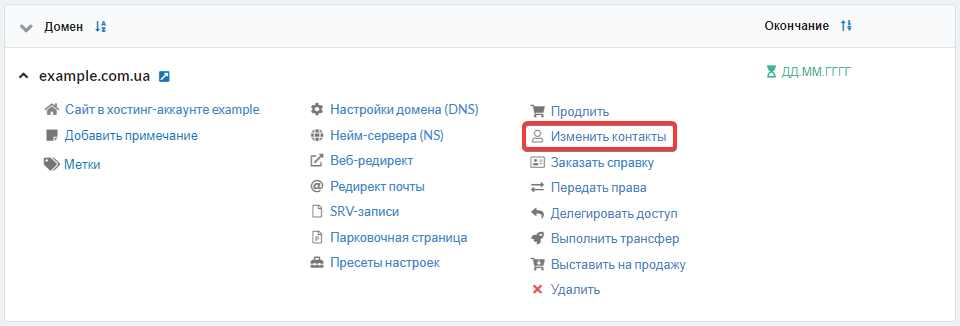
- In the domain menu, click "Change contacts":
- Fill out the form and click "Change contacts":
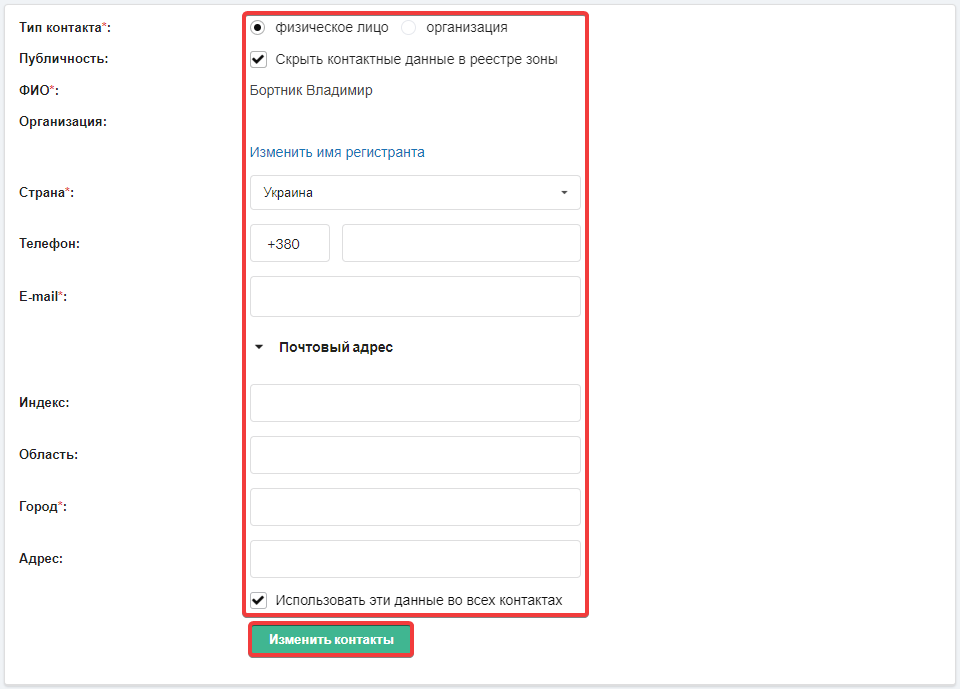
- Fields marked with
*are required. - "Publicity" — visibility of your data in the registry.
- "Use this data in all contacts" — automatic duplication of registrant data to administrative and technical contacts of the domain. If there should be other data there, disable this option and you will have an opportunity to change these contacts.
The operation does not require additional confirmation. Changes are made within 5 minutes after saving.