Gestionarea modulelor cookie care sunt utilizate pentru publicitate, cum ar fi personalizarea anunțurilor, remarketing și analiza performanței anunțurilor.
2.4.1.6. Site already serviced
Sites with the same name cannot be added to multiple hosting accounts at the same time. If a message appears when adding a site stating that it is already being served, it means that it has already been added to another user's control panel.
Site is adding to account which is NOT domain owner
Attention!
You can only confirm ownership of the domain using a TXT record, as described in this article. Confirmation using screenshots of the registrar's panel or other methods is not possible.
If the site is adding to an account that is NOT the domain owner, you must confirm ownership by adding a TXT record: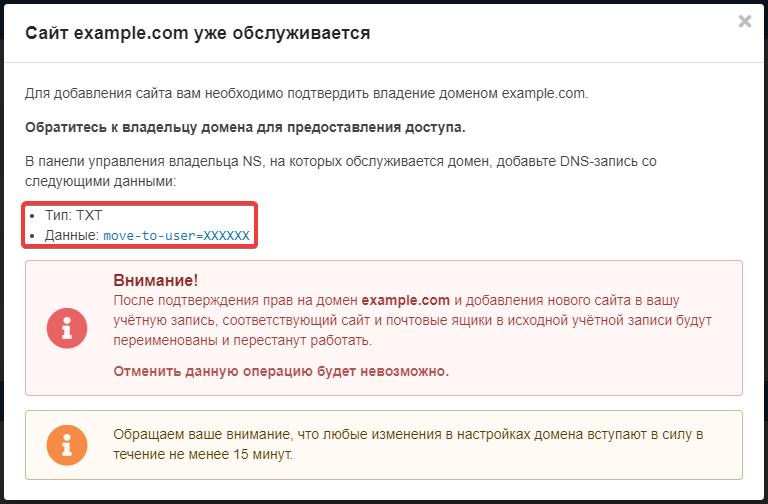
Domain on third-party NS
Attention!
The record must be added for the main domain, not for subdomains. Most often, when adding a record for the main domain, the field named "subdomain", "subdomain" or "name" (the field may have different names) should be left blank or contain the symbol@, depending on the requirements of the NS owner.
- Try add the site to our control panel and you will see a window with the text of the verification TXT record (see image above).
- In the NS owner panel where the domain is served, add a TXT record with the text
move-to-user=XXXXXXfor the main domain (not the subdomain), whereXXXXXXis your account ID, to which you want to add the site. - Wait approximately 30 minutes.
- Try add the site to our control panel again.
Domain on our NS
- Try add the site to our control panel and you will see a window with the text of the verification TXT record (see image above).
- In our control panel for the main domain (not a subdomain), add a record:
- "Subdomain" —
@. - "Type" — "TXT".
- Wait approximately 30 minutes.
- Try add the site to our control panel again.
Site is adding to the domain owner's account
Notes:
- For the domain owner, in the "Domains" section, a line may appear that looks like this: "Site owned by a***n@example.com. Delete?". It means that a site with the domain name exists in another user's hosting account. Clicking the "Delete?" button will delete the site in the other user's hosting account, but the files and databases will not be affected.
- If you want to transfer a site between hosting accounts, use the instruction.
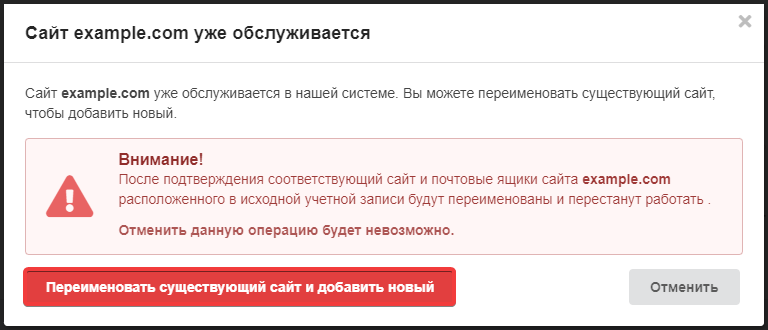
If the site is added to the domain owner's account, there is no need to add a TXT record. Just click "Rename existing site and add new":