Gestionarea modulelor cookie care sunt utilizate pentru publicitate, cum ar fi personalizarea anunțurilor, remarketing și analiza performanței anunțurilor.
2.4.1.12. Indicators of incorrect address records
In the "My sites" section, the site may display indicators of incorrect domain address records: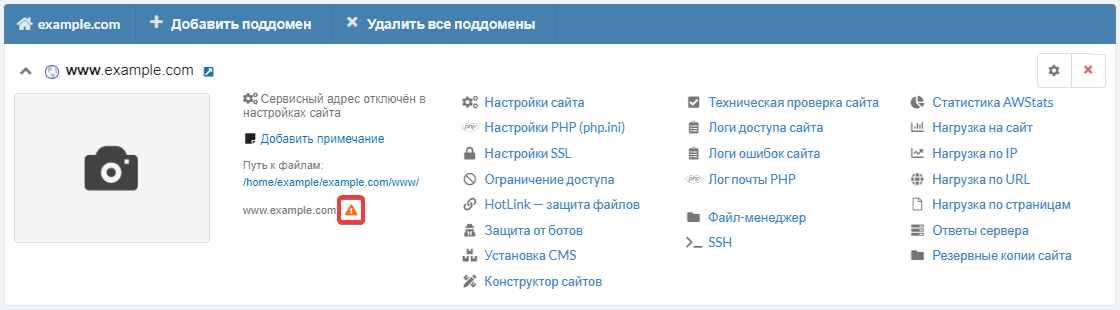
They are displayed when our system automatically determines that the domain address records of type A and/or AAAA are not pointed to the IP addresses of our server where the site is hosted, are completely missing, or cannot be determined.
Possible reasons
- Since the domain was registered, renewed, temporarily activated or its NS was changed, not enough time has passed and no address records have been assigned to it yet. In this case:
- Just to be sure, check that the domain settings in the NS owner panel where it is hosted contain address records and that they point to the main IP address.
- Wait for the information in the DNS cache to refresh.
- The domain is incorrectly pointed to the hosting (address records are missing or they point to a different IP). To fix this, add the missing records and point the domain correctly to our hosting:
- If the domain is hosted on our NS, go to domain settings and add or edit the necessary records, specifying the main IP address in them.
- If the domain is hosted on third-party NS, use the instruction.
- The domain name under which the site was added is not registered. To fix this, try one of the following:
- Register the domain, if it is available and you like the name.
- Change site name, if the domain is already taken by someone else and cannot be registered, or if you don't like its name.
- Ignore the notification and use the service address to work with the site if you do not want to register a domain or change the site name yet.
- The domain has expired. In this case, you need to renew or temporarily enable it, then wait for the information to be refreshed in the DNS cache.
- Web redirect is enabled. If you do not need web redirect and need to configure the site on the hosting, do the following:
- Disable web redirect by selecting "Do not use Web redirect".
- Just to be safe, make sure that there are address records in domain settings and that they point to the main IP address.
- Wait for the information to be refreshed in the DNS cache and for the web redirect to be disabled, which takes up to an hour.
(27)
Comentarii