Gestionarea modulelor cookie care sunt utilizate pentru publicitate, cum ar fi personalizarea anunțurilor, remarketing și analiza performanței anunțurilor.
2.4.1.4. Add site
Attention!
- If the domain is registered with us, only the current domain owner or a user with delegated access to this domain can add the site to the hosting.
- You cannot add a site if the hosting account has reached the limit for the number of subdomains — 999 (total for all sites in the hosting account).
- Do not add sites that may cause the server's IP address to be blocked by foreign providers, as this will negatively affect the availability of other users' sites on the same server. Such sites can only be hosted on VPS or dedicated servers.
Notes:
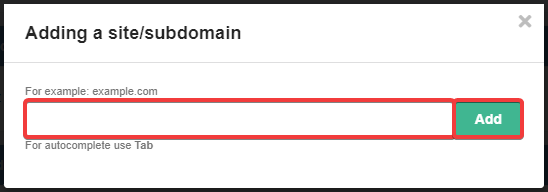
- Autocomplete when entering a name is activated by pressing Tab, → or clicking on the suggested text (gray).
- To resolve the "Domain already serviced" situation, use the instruction.
- The www subdomain is added automatically when you create a site. This allows you to use two commonly accepted addresses for one site. The presence of the www subdomain does not affect the operation of the site. To configure the site to work without www, use the instruction.
- The PHP version when adding a site or subdomain is set to the same as specified in PHP settings of the last site or subdomain added to this hosting account, or if the first site is being added, the last site added within other hosting accounts of the current account. Later, you can change the version to any other.
- Open the "My sites" section.
- At the top of the section, click "Add site/subdomain":

- Enter the site name and click "Add":
- Wait a few minutes for the virtual host and the site root directory to be created.
(14)