Gestionarea modulelor cookie care sunt utilizate pentru publicitate, cum ar fi personalizarea anunțurilor, remarketing și analiza performanței anunțurilor.
4.2.1. Create mailbox
Important points:
- To create a mailbox, you need a mail domain.
- In order for mail to be delivered to the mailbox, the domain must have our MX record (sending is not affected).
- The domain must have mail redirect disabled.
- Maximum number of mailboxes:
- Corporate mail — 999 for 1 mail domain.
- Hosting account mail — 999 total for all mail domains of 1 hosting account.
- At the top of the page, click "Create mailbox".
- Fill out the form and click "Create":
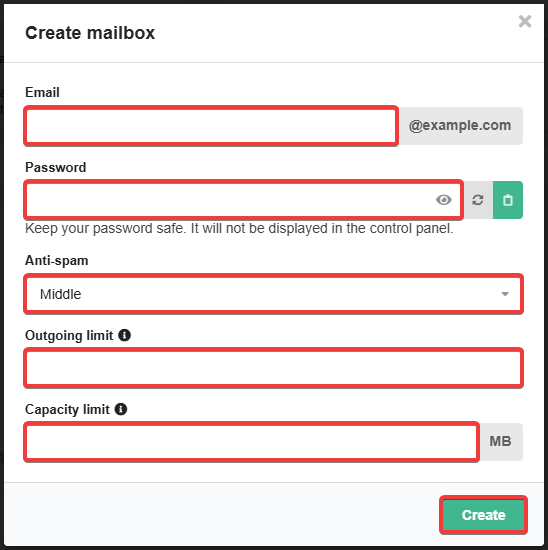
- Email — mailbox name up to the
@character (must not contain the&character and must not end with a hyphen). - Password — mailbox password:
- Length — 8-30 characters.
- Must include at least one character of each of the following types: Latin letters, numbers, special characters
+!@;#$%^&*~()-.. - Should not include part of the name of the mailbox itself.
- Not stored on the hosting. If you forget your password, your only option is to set a new one.
- Antispam — antispam level.
- Outgoing limit — number of messages that can be sent from the mailbox per day (empty or
0— no limit). - Capacity limit — capacity of mail in megabytes that can store in the mailbox (empty or
0— no limit).
- Check the mailbox operation.
(1)
Comentarii
Це спрощення для того, щоб не вводити паролі для кожної скриньки окремо. Але це також дуже зручно.