Gestionarea modulelor cookie care sunt utilizate pentru publicitate, cum ar fi personalizarea anunțurilor, remarketing și analiza performanței anunțurilor.
4.3.1.2.2. Public access to WebMail.Online calendar
Important points:
- For corporate mail only.
- Only the calendar owner can manage public access.
Public link
Public access allows you to connect to the calendar via a special public link (see Webcal) with read-only access: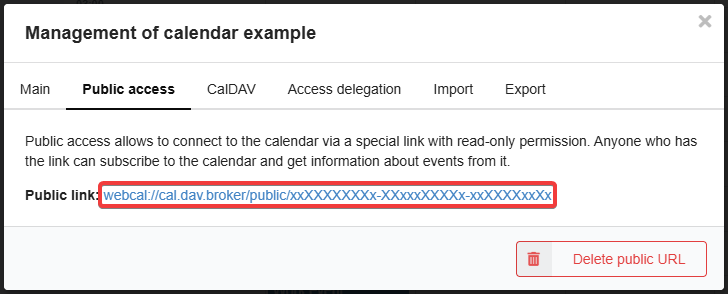
Services and mail clients
- Open Google Calendar.
- In the sidebar near "Other calendars", click ➕ and select "From URL".
- Specify the public link and click "Add calendar".
You can also add a calendar via the settings section ("Settings → Add calendar → From URL").
- Open Proton Calendar.
- In the sidebar next to "My calendars", click ➕ and select "Add calendar from URL".
- Specify the public link and click "Add calendar".
You can also add a calendar via the settings section ("Settings → Calendars → Other calendars → Add calendar from URL").
Similar to CalDAV, but instead of the CalDAV link, you need to specify the public link. The username and other data are not important.